> ## Documentation Index
> Fetch the complete documentation index at: https://docs.qonto.com/llms.txt
> Use this file to discover all available pages before exploring further.
# Verification of Payee
> Verify beneficiary details before initiating SEPA Transfers to reduce fraud and payment errors.
**Mandatory compliance**
Required for all SEPA Credit Transfers and Instant SEPA Credit Transfers under the European Instant Payments Regulation (IPR), with a mandatory implementation deadline of **October 9, 2025**, for all Payment Service Providers (PSPs) in the Eurozone offering SEPA Credit Transfers.
## What is Verification of Payee?
Verification of Payee (VoP) is a new requirement from the SEPA scheme that verifies the beneficiary information to reduce fraud and misdirected payments. VoP applies to all countries in the SEPA region, with mandatory implementation deadlines of **October 9, 2025** for Eurozone PSPs and **January 9, 2027** for non-Eurozone PSPs. The service is **free of charge** for Qonto account holders as mandated by the [EPC's regulation](https://www.europeanpaymentscouncil.eu/what-we-do/other-schemes/verification-payee).
## How to Implement
Creating a SEPA transfer now requires 2 steps:
* **Step 1: Verify payee (i.e. VoP check)**: Call our new Verify Payee endpoint before creating any SEPA transfers. This API call returns:
* the outcome of the verification (4 possible options)
* a token
* **Step 2: Create a transfer**: Call your existing transfer endpoint, but additionally include the token received in step 1
Looking for a full end-to-end walkthrough? Our use case guide covers the complete flow with code examples in Python and Node.js. From listing beneficiaries, verifying the payee (VoP), to submitting the transfer.
### Available verification endpoints
* **Single verification**: Verify individual payee details with a `POST` request to `/v2/sepa/verify_payee` (see [Verify SEPA payee](/api-reference/business-api/payments-transfers/sepa-transfers/verify-payee))
* **Bulk verification**: Verify multiple payees at once with a `POST` request to `/v2/sepa/bulk_verify_payee` (see [Bulk verify SEPA payees](/api-reference/business-api/payments-transfers/sepa-transfers/verify-payee/bulk-verify-payee))
## How to display VoP results to users
According to the new regulation, the VoP outcome must be displayed to the end-user initiating the payment, so they can make an informed decision before authorizing the transfer.
Besides these technical changes, you will also need to make the following operational changes:
* **For manual transfers via API**: the end-user must review the VoP outcome and make a decision based on the result
* **For automated transfers via API:** we recommend including a manual review step whenever the VoP result is not a full match (i.e. `MATCH_RESULT_MATCH`)
**Recommendations:**
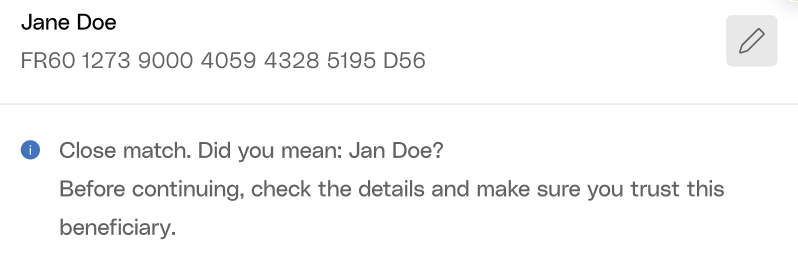
* **Close Match**
For close match results (`MATCH_RESULT_CLOSE_MATCH` ), display the suggested name to the user:
 * **No Match**
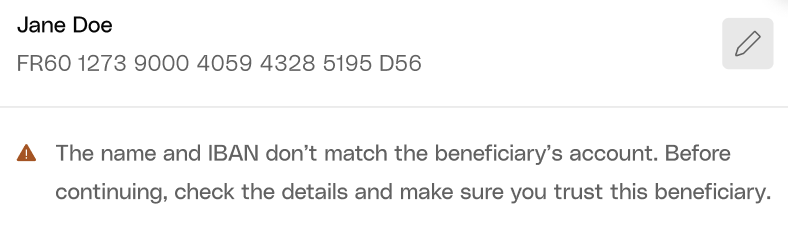
For no match results (`MATCH_RESULT_NO_MATCH` ), display a warning message to the user to proceed with caution and offer the possibility to edit details:
* **No Match**
For no match results (`MATCH_RESULT_NO_MATCH` ), display a warning message to the user to proceed with caution and offer the possibility to edit details:
 * **Verification not possible**
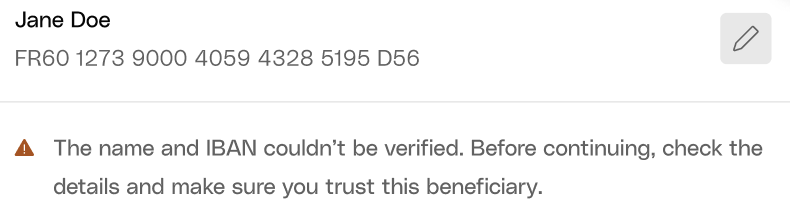
For verification not possible results (`MATCH_RESULT_NOT_POSSIBLE`), display a warning message that the verification is unavailable:
* **Verification not possible**
For verification not possible results (`MATCH_RESULT_NOT_POSSIBLE`), display a warning message that the verification is unavailable:
 ## Testing with Sandbox
When testing Verification of Payee in the Sandbox environment, you can use specific mocked IBANs to simulate different verification outcomes without needing real bank accounts.
### Mocked IBANs
Use these IBANs to test different VoP scenarios:
| IBAN | Result | HTTP Status |
| ------------------------------------------------------- | ------------------------------------------------------------------------- | ----------- |
| Any external (not Qonto) IBAN that are not listed below | `{"matchResult": "MATCH_RESULT_MATCH"}` | `200` |
| `FR9314508000301358631257V60` | `{"matchResult": "MATCH_RESULT_CLOSE_MATCH", "matchedName": "Jon Jones"}` | `200` |
| `FR2817569000504516495173I74` | `{"matchResult": "MATCH_RESULT_NO_MATCH"}` | `200` |
| `FR1817569000407557739829P63` | `{"matchResult": "MATCH_RESULT_NOT_POSSIBLE"}` | `200` |
| `FR7810096000302228946458K04` | `GATEWAY_TIMEOUT_ERROR_RESPONDING_BANK` | `504` |
| `FR4012739000504688938142V51` | `BAD_REQUEST_ERROR_RESPONDING_BANK_INVALID_RESPONSE` | `400` |
| `FR2610096000404733985874B91` | `INTERNAL_SERVER_ERROR_4XX_RESPONDING_BANK` | `500` |
These mocked IBANs are only available in the Sandbox environment and will not work in production.
## Testing with Sandbox
When testing Verification of Payee in the Sandbox environment, you can use specific mocked IBANs to simulate different verification outcomes without needing real bank accounts.
### Mocked IBANs
Use these IBANs to test different VoP scenarios:
| IBAN | Result | HTTP Status |
| ------------------------------------------------------- | ------------------------------------------------------------------------- | ----------- |
| Any external (not Qonto) IBAN that are not listed below | `{"matchResult": "MATCH_RESULT_MATCH"}` | `200` |
| `FR9314508000301358631257V60` | `{"matchResult": "MATCH_RESULT_CLOSE_MATCH", "matchedName": "Jon Jones"}` | `200` |
| `FR2817569000504516495173I74` | `{"matchResult": "MATCH_RESULT_NO_MATCH"}` | `200` |
| `FR1817569000407557739829P63` | `{"matchResult": "MATCH_RESULT_NOT_POSSIBLE"}` | `200` |
| `FR7810096000302228946458K04` | `GATEWAY_TIMEOUT_ERROR_RESPONDING_BANK` | `504` |
| `FR4012739000504688938142V51` | `BAD_REQUEST_ERROR_RESPONDING_BANK_INVALID_RESPONSE` | `400` |
| `FR2610096000404733985874B91` | `INTERNAL_SERVER_ERROR_4XX_RESPONDING_BANK` | `500` |
These mocked IBANs are only available in the Sandbox environment and will not work in production.