> ## Documentation Index
> Fetch the complete documentation index at: https://docs.qonto.com/llms.txt
> Use this file to discover all available pages before exploring further.
# Table
A table is a customizable component that displays data in rows and columns, providing a structured
way to present information. Tables support pagination, alternating row colors, and hover states,
making them ideal for displaying large datasets in an organized manner.
## Default Styling
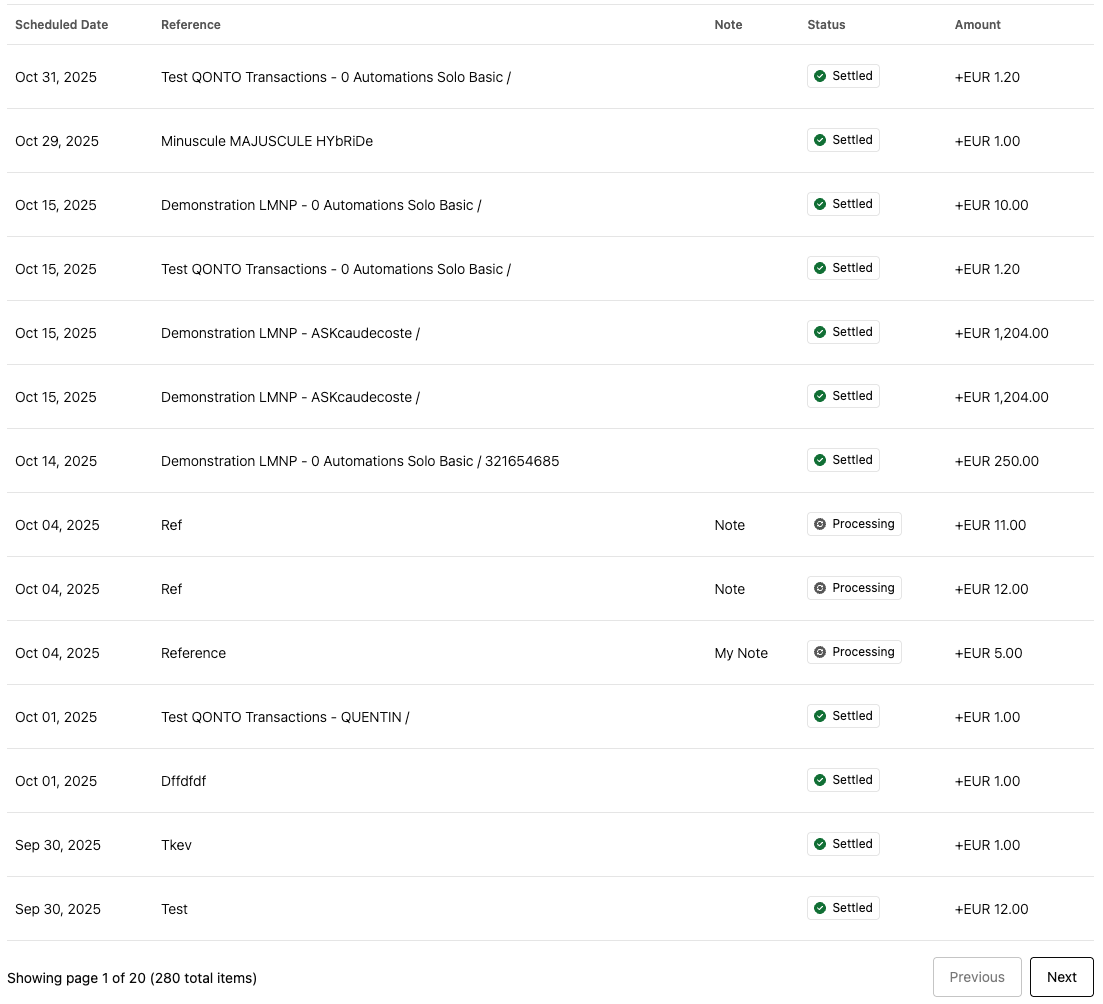
By default, the Table uses Qonto's branding with a clean, professional appearance:
 ## Customization Options
The Table can be customized using the following CSS variables:
| CSS Variable | Description & Accepted Values |
| --------------------------------------------------------- | ----------------------------------------------------------------------------------------------------------------- |
| `--qonto-embed-table-background-color` | Accepts any valid color value (e.g., `#ffffff`, `rgb(255, 255, 255)`). Controls the table background color. |
| `--qonto-embed-table-border` | Accepts any valid border value (e.g., `1px solid #ddd`, `2px solid blue`). Controls the table border. |
| `--qonto-embed-table-header-row-background-color` | Accepts any valid color value. Controls the header row background color. |
| `--qonto-embed-table-header-row-font-color` | Accepts any valid color value. Controls the header row text color. |
| `--qonto-embed-table-header-row-font-size` | Accepts any valid font-size value (e.g., `12px`, `0.875rem`). Controls the header row font size. |
| `--qonto-embed-table-header-row-line-height` | Accepts any valid line-height value (e.g., `1.5`, `18px`). Controls the header row line height. |
| `--qonto-embed-table-header-row-height` | Accepts any valid height value (e.g., `40px`, `3rem`). Controls the header row height. |
| `--qonto-embed-table-header-row-font-weight` | Accepts any valid font-weight value (e.g., `400`, `bold`, `700`). Controls the header row font weight. |
| `--qonto-embed-table-header-row-text-transform` | Accepts any valid text-transform value (e.g., `uppercase`, `lowercase`, `capitalize`). Controls text styling. |
| `--qonto-embed-table-header-row-border` | Accepts any valid border value. Controls all header row borders. |
| `--qonto-embed-table-header-row-border-top` | Accepts any valid border value. Controls the header row top border. |
| `--qonto-embed-table-header-row-border-right` | Accepts any valid border value. Controls the header row right border. |
| `--qonto-embed-table-header-row-border-bottom` | Accepts any valid border value. Controls the header row bottom border. |
| `--qonto-embed-table-header-row-border-left` | Accepts any valid border value. Controls the header row left border. |
| `--qonto-embed-table-body-row-height` | Accepts any valid height value (e.g., `64px`, `4rem`). Controls the body row height. |
| `--qonto-embed-table-body-row-border` | Accepts any valid border value. Controls all body row borders. |
| `--qonto-embed-table-body-row-border-top` | Accepts any valid border value. Controls the body row top border. |
| `--qonto-embed-table-body-row-border-right` | Accepts any valid border value. Controls the body row right border. |
| `--qonto-embed-table-body-row-border-bottom` | Accepts any valid border value. Controls the body row bottom border. |
| `--qonto-embed-table-body-row-border-left` | Accepts any valid border value. Controls the body row left border. |
| `--qonto-embed-table-body-row-background-color-hover` | Accepts any valid color value. Controls the body row background color on hover. |
| `--qonto-embed-table-body-row-alternate-background-color` | Accepts any valid color value. Controls the alternate (even) row background color. |
| `--qonto-embed-table-body-font-weight` | Accepts any valid font-weight value. Controls the body row font weight. |
| `--qonto-embed-table-body-font-size` | Accepts any valid font-size value. Controls the body row font size. |
| `--qonto-embed-table-body-row-line-height` | Accepts any valid line-height value. Controls the body row line height. |
| `--qonto-embed-table-body-font-color` | Accepts any valid color value. Controls the body row text color. |
| `--qonto-embed-table-font-weight` | Accepts any valid font-weight value. Controls the default font weight for the entire table. |
| `--qonto-embed-table-font-size` | Accepts any valid font-size value. Controls the default font size for the entire table. |
| `--qonto-embed-table-pagination-separation` | Accepts any valid margin/spacing value (e.g., `16px`, `1rem`). Controls the spacing between table and pagination. |
| `--qonto-embed-table-pagination-font-color` | Accepts any valid color value. Controls the pagination text color. |
| `--qonto-embed-table-pagination-font-size` | Accepts any valid font-size value. Controls the pagination font size. |
CSS variable priority follows a cascade: specific variables (e.g.,
`--qonto-embed-table-header-row-border-top`) take precedence over general
variables (e.g., `--qonto-embed-table-header-row-border`), which in turn take
precedence over global table variables (e.g.,
`--qonto-embed-table-font-weight`).
### Example
This example shows a customized Table with different colors, borders, and spacing:
```css theme={null}
:root {
--qonto-embed-table-border: none;
--qonto-embed-table-header-row-background-color: #f9fafb;
--qonto-embed-table-header-row-border: none;
--qonto-embed-table-header-row-font-color: #374151;
--qonto-embed-table-header-row-font-size: 0.75rem;
--qonto-embed-table-header-row-font-weight: bold;
--qonto-embed-table-header-row-text-transform: uppercase;
--qonto-embed-table-body-row-height: 52px;
--qonto-embed-table-body-row-border: none;
--qonto-embed-table-body-font-color: #6b7280;
--qonto-embed-table-body-font-weight: 400;
--qonto-embed-table-body-row-alternate-background-color: #f9fafb;
--qonto-embed-table-pagination-separation: 16px;
--qonto-embed-table-pagination-font-color: #6b7280;
--qonto-embed-table-pagination-font-size: 12px;
}
```
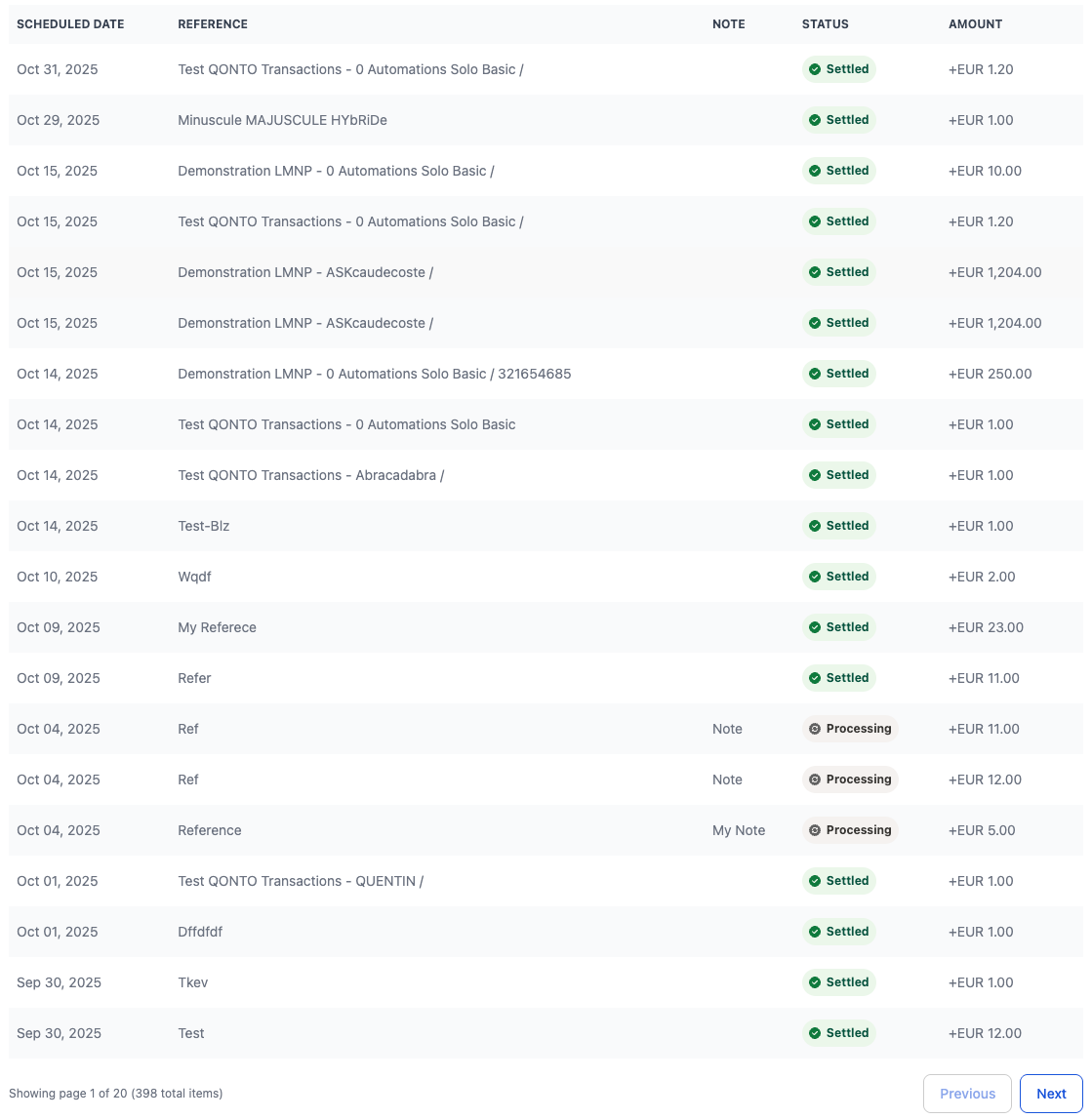
The result is a table with a custom color scheme, adjusted row heights, and improved spacing, as shown
below:
## Customization Options
The Table can be customized using the following CSS variables:
| CSS Variable | Description & Accepted Values |
| --------------------------------------------------------- | ----------------------------------------------------------------------------------------------------------------- |
| `--qonto-embed-table-background-color` | Accepts any valid color value (e.g., `#ffffff`, `rgb(255, 255, 255)`). Controls the table background color. |
| `--qonto-embed-table-border` | Accepts any valid border value (e.g., `1px solid #ddd`, `2px solid blue`). Controls the table border. |
| `--qonto-embed-table-header-row-background-color` | Accepts any valid color value. Controls the header row background color. |
| `--qonto-embed-table-header-row-font-color` | Accepts any valid color value. Controls the header row text color. |
| `--qonto-embed-table-header-row-font-size` | Accepts any valid font-size value (e.g., `12px`, `0.875rem`). Controls the header row font size. |
| `--qonto-embed-table-header-row-line-height` | Accepts any valid line-height value (e.g., `1.5`, `18px`). Controls the header row line height. |
| `--qonto-embed-table-header-row-height` | Accepts any valid height value (e.g., `40px`, `3rem`). Controls the header row height. |
| `--qonto-embed-table-header-row-font-weight` | Accepts any valid font-weight value (e.g., `400`, `bold`, `700`). Controls the header row font weight. |
| `--qonto-embed-table-header-row-text-transform` | Accepts any valid text-transform value (e.g., `uppercase`, `lowercase`, `capitalize`). Controls text styling. |
| `--qonto-embed-table-header-row-border` | Accepts any valid border value. Controls all header row borders. |
| `--qonto-embed-table-header-row-border-top` | Accepts any valid border value. Controls the header row top border. |
| `--qonto-embed-table-header-row-border-right` | Accepts any valid border value. Controls the header row right border. |
| `--qonto-embed-table-header-row-border-bottom` | Accepts any valid border value. Controls the header row bottom border. |
| `--qonto-embed-table-header-row-border-left` | Accepts any valid border value. Controls the header row left border. |
| `--qonto-embed-table-body-row-height` | Accepts any valid height value (e.g., `64px`, `4rem`). Controls the body row height. |
| `--qonto-embed-table-body-row-border` | Accepts any valid border value. Controls all body row borders. |
| `--qonto-embed-table-body-row-border-top` | Accepts any valid border value. Controls the body row top border. |
| `--qonto-embed-table-body-row-border-right` | Accepts any valid border value. Controls the body row right border. |
| `--qonto-embed-table-body-row-border-bottom` | Accepts any valid border value. Controls the body row bottom border. |
| `--qonto-embed-table-body-row-border-left` | Accepts any valid border value. Controls the body row left border. |
| `--qonto-embed-table-body-row-background-color-hover` | Accepts any valid color value. Controls the body row background color on hover. |
| `--qonto-embed-table-body-row-alternate-background-color` | Accepts any valid color value. Controls the alternate (even) row background color. |
| `--qonto-embed-table-body-font-weight` | Accepts any valid font-weight value. Controls the body row font weight. |
| `--qonto-embed-table-body-font-size` | Accepts any valid font-size value. Controls the body row font size. |
| `--qonto-embed-table-body-row-line-height` | Accepts any valid line-height value. Controls the body row line height. |
| `--qonto-embed-table-body-font-color` | Accepts any valid color value. Controls the body row text color. |
| `--qonto-embed-table-font-weight` | Accepts any valid font-weight value. Controls the default font weight for the entire table. |
| `--qonto-embed-table-font-size` | Accepts any valid font-size value. Controls the default font size for the entire table. |
| `--qonto-embed-table-pagination-separation` | Accepts any valid margin/spacing value (e.g., `16px`, `1rem`). Controls the spacing between table and pagination. |
| `--qonto-embed-table-pagination-font-color` | Accepts any valid color value. Controls the pagination text color. |
| `--qonto-embed-table-pagination-font-size` | Accepts any valid font-size value. Controls the pagination font size. |
CSS variable priority follows a cascade: specific variables (e.g.,
`--qonto-embed-table-header-row-border-top`) take precedence over general
variables (e.g., `--qonto-embed-table-header-row-border`), which in turn take
precedence over global table variables (e.g.,
`--qonto-embed-table-font-weight`).
### Example
This example shows a customized Table with different colors, borders, and spacing:
```css theme={null}
:root {
--qonto-embed-table-border: none;
--qonto-embed-table-header-row-background-color: #f9fafb;
--qonto-embed-table-header-row-border: none;
--qonto-embed-table-header-row-font-color: #374151;
--qonto-embed-table-header-row-font-size: 0.75rem;
--qonto-embed-table-header-row-font-weight: bold;
--qonto-embed-table-header-row-text-transform: uppercase;
--qonto-embed-table-body-row-height: 52px;
--qonto-embed-table-body-row-border: none;
--qonto-embed-table-body-font-color: #6b7280;
--qonto-embed-table-body-font-weight: 400;
--qonto-embed-table-body-row-alternate-background-color: #f9fafb;
--qonto-embed-table-pagination-separation: 16px;
--qonto-embed-table-pagination-font-color: #6b7280;
--qonto-embed-table-pagination-font-size: 12px;
}
```
The result is a table with a custom color scheme, adjusted row heights, and improved spacing, as shown
below: