> ## Documentation Index
> Fetch the complete documentation index at: https://docs.qonto.com/llms.txt
> Use this file to discover all available pages before exploring further.
# Display Card
The `displayCard` function presents a card interface that can showcase various types of information and operations, such
as cardholder details, PIN display and actions like blocking the card or setting/changing the PIN.
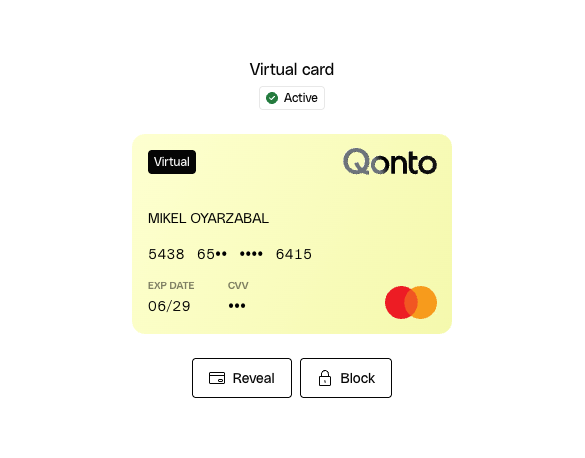 For security and compliance reasons, the card information can't leave the Qonto domain and therefore the UI this element
injects into your website is implemented with an iframe. This way, the card data is securely handled by Qonto while still
being accessible from your application.
In these docs we have a guide that explains how to [customize the UI elements](/api-reference/sdk-libraries/doc-pages/customizing-ui-elements)
which precisely uses the `displayCard` function as an example. We recommend you to check it out if you want to learn how
to show the card details UI and adapt its UI to your branding.
## Show PAN
The **Show PAN** action reveals the card's full number (PAN) and CVV directly inside the iframe. For security, the
sensitive numbers are revealed only briefly and are automatically masked again after a short delay.
This action is available for any card type (physical, virtual, instant, or advertising), but only to the **cardholder**:
the button is shown when the authenticated membership is the member the card belongs to, and the card has a number to
reveal (i.e. an active/live card). When someone other than the cardholder views the card, Show PAN stays hidden — there
is no partner setting that can override this, as the sensitive card data must never be exposed to a non-holder.
## Block card
The **Block card** action temporarily locks the card. Enable it by passing `allowBlocking: true` in the `displayCard`
settings or `canBlock=true` in the iframe url. It is displayed only while the card status is **live**, and it is hidden once the card is already blocked.
Unlike Show PAN and Show PIN, blocking is not restricted to the cardholder: depending on the permissions you grant, an
owner or admin can block a card that belongs to another member. Because access to this action ultimately depends on the
viewer's role and your integration, the button is shown only when you opt in via `allowBlocking` and the card is in a
lockable (live) state.
## Show PIN
The **Show PIN** action reveals the card's PIN inside the iframe. Enable it by passing `allowPinReveal: true` in the
`displayCard` settings or `canSeePin=true` in the iframe url.
Even when enabled, the button is only displayed when all of the following are true: the card is a **physical** card, its
status is **live**, and the authenticated membership is the **cardholder**. It is therefore hidden for virtual, instant,
and advertising cards, for non-live cards, and for anyone other than the cardholder.
## Set and reset PIN
From the Display Card UI, the user can also start a **Set PIN** flow (for a card that
has never had a PIN set) or a **Reset PIN** flow (for a card that already has one). The
action button is labelled *Choose PIN code* the first time and *Reset PIN* afterwards.
For security and compliance reasons, the card information can't leave the Qonto domain and therefore the UI this element
injects into your website is implemented with an iframe. This way, the card data is securely handled by Qonto while still
being accessible from your application.
In these docs we have a guide that explains how to [customize the UI elements](/api-reference/sdk-libraries/doc-pages/customizing-ui-elements)
which precisely uses the `displayCard` function as an example. We recommend you to check it out if you want to learn how
to show the card details UI and adapt its UI to your branding.
## Show PAN
The **Show PAN** action reveals the card's full number (PAN) and CVV directly inside the iframe. For security, the
sensitive numbers are revealed only briefly and are automatically masked again after a short delay.
This action is available for any card type (physical, virtual, instant, or advertising), but only to the **cardholder**:
the button is shown when the authenticated membership is the member the card belongs to, and the card has a number to
reveal (i.e. an active/live card). When someone other than the cardholder views the card, Show PAN stays hidden — there
is no partner setting that can override this, as the sensitive card data must never be exposed to a non-holder.
## Block card
The **Block card** action temporarily locks the card. Enable it by passing `allowBlocking: true` in the `displayCard`
settings or `canBlock=true` in the iframe url. It is displayed only while the card status is **live**, and it is hidden once the card is already blocked.
Unlike Show PAN and Show PIN, blocking is not restricted to the cardholder: depending on the permissions you grant, an
owner or admin can block a card that belongs to another member. Because access to this action ultimately depends on the
viewer's role and your integration, the button is shown only when you opt in via `allowBlocking` and the card is in a
lockable (live) state.
## Show PIN
The **Show PIN** action reveals the card's PIN inside the iframe. Enable it by passing `allowPinReveal: true` in the
`displayCard` settings or `canSeePin=true` in the iframe url.
Even when enabled, the button is only displayed when all of the following are true: the card is a **physical** card, its
status is **live**, and the authenticated membership is the **cardholder**. It is therefore hidden for virtual, instant,
and advertising cards, for non-live cards, and for anyone other than the cardholder.
## Set and reset PIN
From the Display Card UI, the user can also start a **Set PIN** flow (for a card that
has never had a PIN set) or a **Reset PIN** flow (for a card that already has one). The
action button is labelled *Choose PIN code* the first time and *Reset PIN* afterwards.
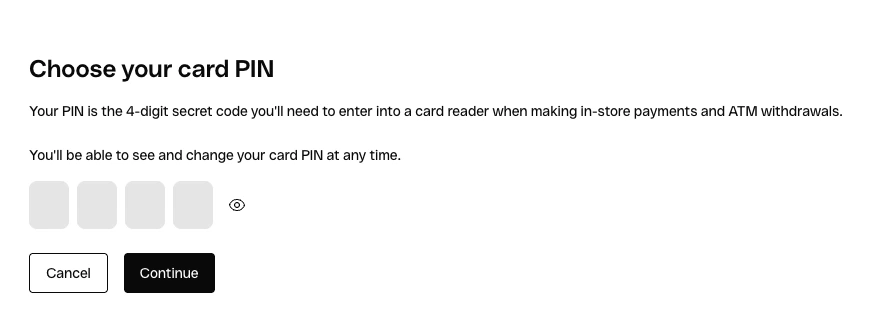
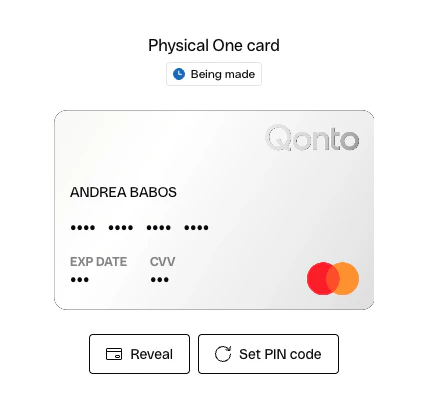 The full flow — choose PIN, confirm PIN, success, and an optional "see PIN" recap —
runs entirely inside the same iframe, so no extra SDK calls or partner integration are
required. The button is only shown when the cardholder has the right permissions on the
card; otherwise it stays hidden.
The full flow — choose PIN, confirm PIN, success, and an optional "see PIN" recap —
runs entirely inside the same iframe, so no extra SDK calls or partner integration are
required. The button is only shown when the cardholder has the right permissions on the
card; otherwise it stays hidden.
 For details about the SDK function to call to display the card details UI, please refer to the
[displayCard API Reference](/api-reference/sdk-libraries/variables/cards#displaycard).
For details about the SDK function to call to display the card details UI, please refer to the
[displayCard API Reference](/api-reference/sdk-libraries/variables/cards#displaycard).