> ## Documentation Index
> Fetch the complete documentation index at: https://docs.qonto.com/llms.txt
> Use this file to discover all available pages before exploring further.
# API key
If you are a Qonto customer, you can authenticate by using the `login` and the `secret key` of your Qonto organization.
To do so:
1. Go to the **Qonto web app** of the environment you are currently working on 👇
* Sandbox: From the [Toolkit](https://developers.qonto.com/toolkit/), click on **"Sandbox web app"**.
If you need an access to our Sandbox environment, please sign up to the [Developer Portal](https://developers.qonto.com/).
* Production: Go to the [Production web app](https://app.qonto.com).
2. If you have several organizations, choose the organization to which you want to connect.
3. Click on **Integrations and Partnerships** > **API key**. 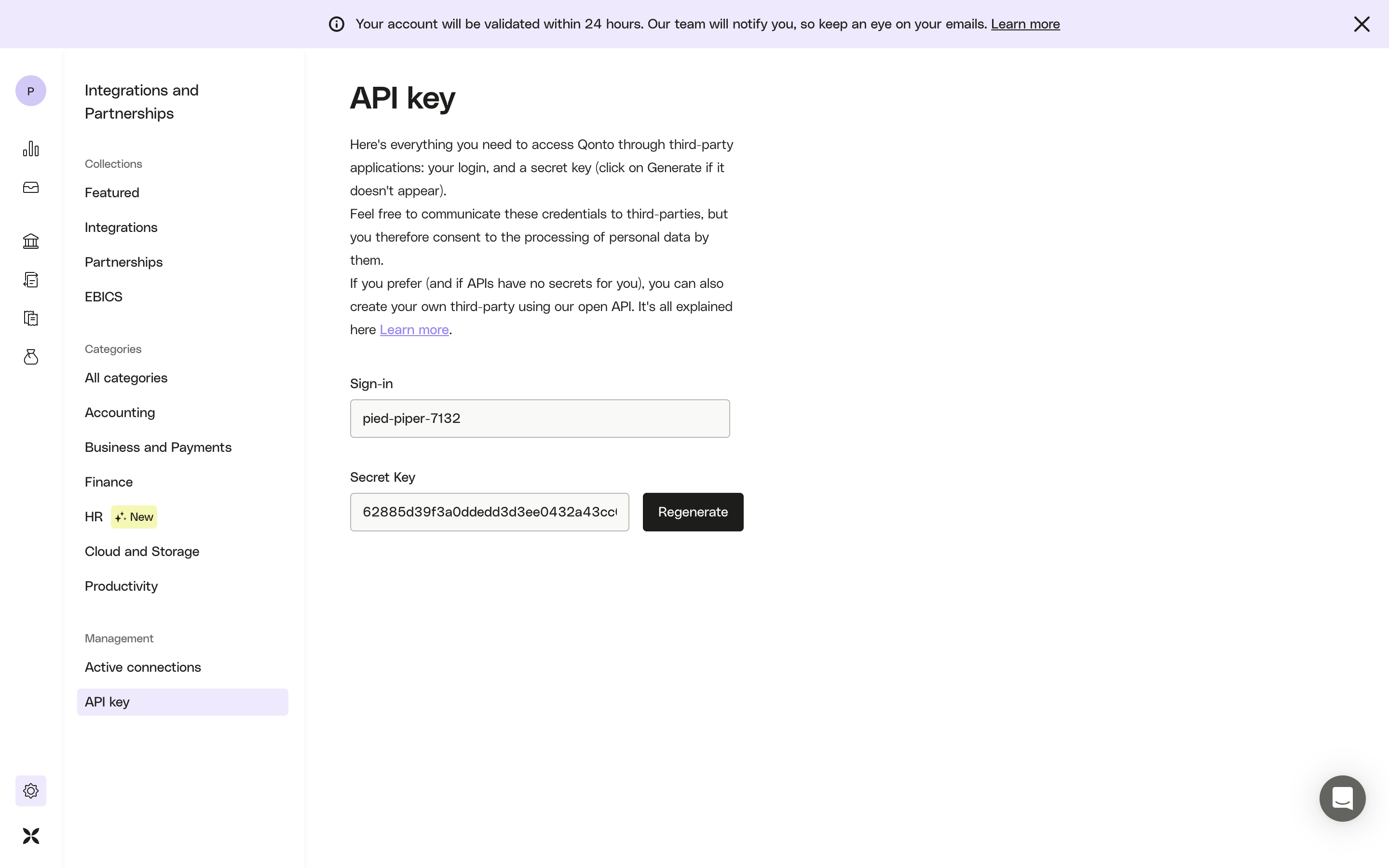 4. (optional) Click on the **Generate** button to create your secret key.
5. Use the following header in your API calls 👇
```json theme={null}
Authorization: {sign-in}:{secret-key}
```
As an example, to authenticate an organization whose `sign-in` is `pied-piper-7132` and `secret key` is `62885d39f3a0ddedd3d3ee0432a43ccr`, your request will look like this:
```curl cURL example theme={null}
curl --location --globoff 'https://thirdparty.qonto.com/v2/organization' \
--header 'Authorization: pied-piper-7132:62885d39f3a0ddedd3d3ee0432a43ccr'
```
While this may resemble HTTP Basic Authentication,**it's not.** This approach simply concatenates the `sign-in` and `secret-key` values with a colon (`:`) separator — **no Base64 encoding involved.**
6. Make your first request to `https://thirdparty.qonto.com/v2/organization`
* If you get a **200 Success** code (with details of your organization)\
→ 🎉 Congratulations, your Authorization header is valid
* If you get a **401 Unauthorized** error code
→ Double-check your header name & value
4. (optional) Click on the **Generate** button to create your secret key.
5. Use the following header in your API calls 👇
```json theme={null}
Authorization: {sign-in}:{secret-key}
```
As an example, to authenticate an organization whose `sign-in` is `pied-piper-7132` and `secret key` is `62885d39f3a0ddedd3d3ee0432a43ccr`, your request will look like this:
```curl cURL example theme={null}
curl --location --globoff 'https://thirdparty.qonto.com/v2/organization' \
--header 'Authorization: pied-piper-7132:62885d39f3a0ddedd3d3ee0432a43ccr'
```
While this may resemble HTTP Basic Authentication,**it's not.** This approach simply concatenates the `sign-in` and `secret-key` values with a colon (`:`) separator — **no Base64 encoding involved.**
6. Make your first request to `https://thirdparty.qonto.com/v2/organization`
* If you get a **200 Success** code (with details of your organization)\
→ 🎉 Congratulations, your Authorization header is valid
* If you get a **401 Unauthorized** error code
→ Double-check your header name & value