> ## Documentation Index
> Fetch the complete documentation index at: https://docs.qonto.com/llms.txt
> Use this file to discover all available pages before exploring further.
# How to generate and download a Factur-X invoice
Generating invoices programmatically speeds up your billing cycle and ensures every invoice meets electronic invoicing standards without manual intervention. In this guide, we will find or create a client, draft and finalize an invoice, then poll until the [Factur-X PDF](/api-reference/business-api/expense-management/client-quotes-notes/introduction-factur-x) (a standard PDF with embedded XML required for e-invoicing compliance) is ready to download.
> **Example:** A SaaS platform automatically generates a Qonto invoice at the end of each billing period and sends the Factur-X PDF to the customer, with no manual step required.
**Prerequisites:**
* E-invoicing must be enabled on your Qonto account.
* Scopes: `client.read`, `client.write`, `client_invoice.read`, `client_invoice.write`, `attachment.read`, *`organization.read` (optional)*.
Look up an existing client by email or create a new one. Save the `client_id` — you'll need it in the next step.
Endpoint: [List clients](/api-reference/business-api/clients/list-clients) · [Create a client](/api-reference/business-api/clients/create-a-client)
**OAuth scopes required:** `client.read`, `client.write`
```python theme={null}
import requests
BASE_URL = "https://thirdparty.qonto.com/v2"
headers = {
"Authorization": "Bearer {your_access_token}",
"Content-Type": "application/json",
}
# Option A: Find an existing client
search_response = requests.get(
f"{BASE_URL}/clients",
headers=headers,
params={"filter[email]": "contact@acmecorp.com"},
)
search_response.raise_for_status()
clients = search_response.json()["clients"]
if clients:
client_id = clients[0]["id"]
print(f"Found existing client: {client_id}")
else:
# Option B: Create a new client
create_response = requests.post(
f"{BASE_URL}/clients",
headers=headers,
json={
"name": "Acme Corp",
"kind": "company",
"email": "contact@acmecorp.com",
"currency": "EUR", # Required
"locale": "en", # Required
"tax_identification_number": "123456789", # Required for creating client invoices
"billing_address": {
"street_address": "1 Market Street",
"city": "Paris",
"zip_code": "75001",
"country_code": "FR",
},
},
)
create_response.raise_for_status()
client_id = create_response.json()["client"]["id"]
print(f"Created new client: {client_id}")
```
```javascript theme={null}
const BASE_URL = "https://thirdparty.qonto.com/v2";
const headers = {
Authorization: "Bearer {your_access_token}",
"Content-Type": "application/json",
};
// Option A: Find an existing client
const searchResponse = await fetch(
`${BASE_URL}/clients?${new URLSearchParams({ "filter[email]": "contact@acmecorp.com" })}`,
{ headers }
);
const { clients } = await searchResponse.json();
let clientId;
if (clients.length > 0) {
clientId = clients[0].id;
console.log(`Found existing client: ${clientId}`);
} else {
// Option B: Create a new client
const createResponse = await fetch(`${BASE_URL}/clients`, {
method: "POST",
headers,
body: JSON.stringify({
name: "Acme Corp",
kind: "company",
email: "contact@acmecorp.com",
currency: "EUR", // Required
locale: "en", // Required
tax_identification_number: "123456789", // Required for creating client invoices
billing_address: {
street_address: "1 Market Street",
city: "Paris",
zip_code: "75001",
country_code: "FR",
},
}),
});
const { client } = await createResponse.json();
clientId = client.id;
console.log(`Created new client: ${clientId}`);
}
```
The invoice must reference the Qonto bank account where you want to receive payment. Fetch your organization to retrieve the IBAN of the account you'll use.
Endpoint: [Retrieve the authenticated organization and list bank accounts](/api-reference/business-api/accounts-organizations/organizations/retrieve-the-authenticated-organization-and-list-bank-accounts)
**OAuth scope required:** `organization.read`
This step is optional if you already know the IBAN of the account you want to use.
```python theme={null}
response = requests.get(f"{BASE_URL}/organization", headers=headers)
response.raise_for_status()
bank_accounts = response.json()["organization"]["bank_accounts"]
# Use the first account, or filter by slug/currency as needed
receiving_iban = bank_accounts[0]["iban"]
print(f"Receiving IBAN: {receiving_iban}")
```
```javascript theme={null}
const orgResponse = await fetch(`${BASE_URL}/organization`, { headers });
if (!orgResponse.ok) throw new Error(`HTTP ${orgResponse.status}`);
const { organization } = await orgResponse.json();
// Use the first account, or filter by slug/currency as needed
const receivingIban = organization.bank_accounts[0].iban;
console.log(`Receiving IBAN: ${receivingIban}`);
```
Create the invoice in draft state. It will not yet be sent or assigned a number.
Endpoint: [Create a client invoice](/api-reference/business-api/expense-management/client-quotes-notes/client-invoices/create-a-client-invoice)
**OAuth scope required:** `client_invoice.write`
```python theme={null}
from datetime import date, timedelta
today = date.today()
response = requests.post(
f"{BASE_URL}/client_invoices",
headers=headers,
json={
"client_id": client_id,
"issue_date": today.isoformat(),
"due_date": (today + timedelta(days=30)).isoformat(),
"status": "draft",
"payment_methods": {
"iban": receiving_iban,
},
"items": [
{
"title": "Consulting Services — March 2026",
"quantity": "10",
"unit": "hour",
"unit_price": {"value": "150.00", "currency": "EUR"},
"vat_rate": "0.20",
}
],
},
)
response.raise_for_status()
invoice = response.json()["client_invoice"]
invoice_id = invoice["id"]
print(f"Invoice draft created: {invoice_id}")
```
```javascript theme={null}
const today = new Date().toISOString().split("T")[0];
const dueDate = new Date(Date.now() + 30 * 86400000).toISOString().split("T")[0];
const invoiceResponse = await fetch(`${BASE_URL}/client_invoices`, {
method: "POST",
headers,
body: JSON.stringify({
client_id: clientId,
issue_date: today,
due_date: dueDate,
status: "draft",
payment_methods: {
iban: receivingIban,
},
items: [
{
title: "Consulting Services — March 2026",
quantity: "10",
unit: "hour",
unit_price: { value: "150.00", currency: "EUR" },
vat_rate: "0.20",
},
],
}),
});
if (!invoiceResponse.ok) throw new Error(`HTTP ${invoiceResponse.status}`);
const { client_invoice: invoice } = await invoiceResponse.json();
const invoiceId = invoice.id;
console.log(`Invoice draft created: ${invoiceId}`);
```
Finalizing the invoice assigns it an official number, locks it for editing, and triggers the asynchronous generation of the Factur-X PDF.
Endpoint: [Finalize a client invoice](/api-reference/business-api/expense-management/client-quotes-notes/client-invoices/finalize-a-client-invoice)
**OAuth scope required:** `client_invoice.write`
```python theme={null}
response = requests.post(
f"{BASE_URL}/client_invoices/{invoice_id}/finalize",
headers=headers,
)
response.raise_for_status()
finalized_invoice = response.json()["client_invoice"]
attachment_id = finalized_invoice.get("attachment_id") # May be None initially
finalized_at = finalized_invoice["finalized_at"]
print(f"Invoice finalized at {finalized_at} — attachment: {attachment_id}")
```
```javascript theme={null}
const finalizeResponse = await fetch(
`${BASE_URL}/client_invoices/${invoiceId}/finalize`,
{ method: "POST", headers }
);
if (!finalizeResponse.ok) throw new Error(`HTTP ${finalizeResponse.status}`);
const { client_invoice: finalizedInvoice } = await finalizeResponse.json();
let attachmentId = finalizedInvoice.attachment_id ?? null; // May be null initially
const finalizedAt = finalizedInvoice.finalized_at;
console.log(`Invoice finalized at ${finalizedAt} — attachment: ${attachmentId}`);
```
The Factur-X PDF is generated asynchronously after finalization. The `attachment_id` may not be set immediately on the invoice — re-fetch the invoice until it appears, then poll `GET /attachments/{id}` until it returns `200`. That is your signal to download.
Do not download the PDF until the attachment endpoint returns `200`.
Endpoints: [Retrieve a client invoice](/api-reference/business-api/expense-management/client-quotes-notes/client-invoices/retrieve-a-client-invoice) · [Retrieve an attachment](/api-reference/business-api/expense-management/attachments/retrieve-an-attachment)
**OAuth scope required:** `client_invoice.read`, `attachment.read`
```python theme={null}
import time
MAX_ATTEMPTS = 15
POLL_INTERVAL_SECONDS = 2
attachment = None
for attempt in range(MAX_ATTEMPTS):
# attachment_id may not be set immediately — re-fetch the invoice if needed
if not attachment_id:
invoice_response = requests.get(
f"{BASE_URL}/client_invoices/{invoice_id}",
headers=headers,
)
invoice_response.raise_for_status()
attachment_id = invoice_response.json()["client_invoice"].get("attachment_id")
if not attachment_id:
print(f"Attempt {attempt + 1}/{MAX_ATTEMPTS} — attachment_id not set yet, waiting...")
time.sleep(POLL_INTERVAL_SECONDS)
continue
attachment_response = requests.get(
f"{BASE_URL}/attachments/{attachment_id}",
headers=headers,
)
attachment_response.raise_for_status()
attachment = attachment_response.json()["attachment"]
print("Factur-X PDF is ready!")
break
else:
raise TimeoutError("Factur-X PDF was not ready within the timeout period.")
```
```javascript theme={null}
const MAX_ATTEMPTS = 15;
const POLL_INTERVAL_MS = 2000;
let attachment;
for (let attempt = 0; attempt < MAX_ATTEMPTS; attempt++) {
// attachment_id may not be set immediately — re-fetch the invoice if needed
if (!attachmentId) {
const invoiceResponse = await fetch(
`${BASE_URL}/client_invoices/${invoiceId}`,
{ headers }
);
if (!invoiceResponse.ok) throw new Error(`HTTP ${invoiceResponse.status}`);
const { client_invoice } = await invoiceResponse.json();
attachmentId = client_invoice.attachment_id ?? null;
if (!attachmentId) {
console.log(`Attempt ${attempt + 1}/${MAX_ATTEMPTS} — attachment_id not set yet, waiting...`);
await new Promise((resolve) => setTimeout(resolve, POLL_INTERVAL_MS));
continue;
}
}
const attachmentResponse = await fetch(
`${BASE_URL}/attachments/${attachmentId}`,
{ headers }
);
if (!attachmentResponse.ok) throw new Error(`HTTP ${attachmentResponse.status}`);
attachment = (await attachmentResponse.json()).attachment;
console.log("Factur-X PDF is ready!");
break;
}
if (!attachment) {
throw new Error("Factur-X PDF was not ready within the timeout period.");
}
```
Download the file from the attachment URL. The URL is valid for **30 minutes**, download immediately.
```python theme={null}
import os
file_response = requests.get(attachment["url"])
file_response.raise_for_status()
os.makedirs("./client_invoices", exist_ok=True)
file_path = f"./client_invoices/{attachment['file_name']}"
with open(file_path, "wb") as f:
f.write(file_response.content)
print(f"Downloaded Factur-X PDF: {file_path}")
```
```javascript theme={null}
import { writeFile, mkdir } from "node:fs/promises";
const fileResponse = await fetch(attachment.url);
if (!fileResponse.ok) throw new Error(`Download failed: ${fileResponse.status}`);
await mkdir("./client_invoices", { recursive: true });
const buffer = Buffer.from(await fileResponse.arrayBuffer());
const filePath = `./client_invoices/${attachment.file_name}`;
await writeFile(filePath, buffer);
console.log(`Downloaded Factur-X PDF: ${filePath}`);
```
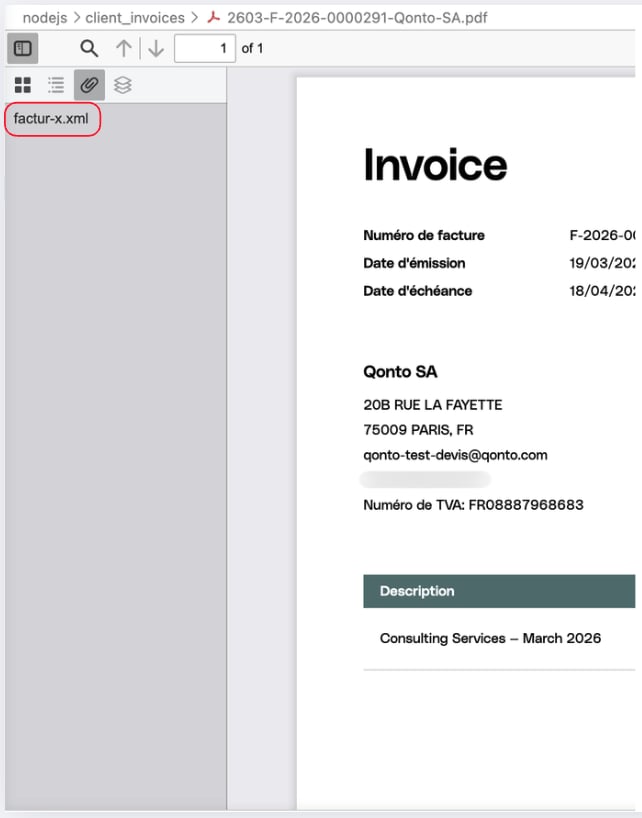
To verify the Factur-X XML is correctly embedded, open the PDF in Adobe Acrobat Reader and check for a paperclip icon, it should contain a `factur-x.xml` attachment.
 **Example output:**
```
[Step 1] Find or create client
Found existing client: b84a2798-xxxx-xxxx-xxxx-xxxxxxxxxxxx
[Step 2] GET /organization
Receiving IBAN: FR761695xxxxxxxxxxxxxxxxxxx
[Step 3] POST /client_invoices (draft)
Invoice draft created: 019d07ca-xxxx-xxxx-xxxx-xxxxxxxxxxxx
[Step 4] POST /client_invoices/{id}/finalize
Invoice finalized at 2026-03-19T20:30:01Z — attachment_id: null
[Step 5] Poll GET /attachments/{id} until Factur-X is ready
Attempt 1/15 — attachment_id not set yet, waiting...
Attempt 2/15 - Factur-X PDF is ready!
[Step 6] Download Factur-X PDF
Downloaded Factur-X PDF: ./client_invoices/2603-F-2026-0000291-Qonto-SA.pdf
```
We now have the finalized Factur-X PDF downloaded locally. It contains the embedded `factur-x.xml` file required for electronic invoicing compliance.
***
**Example output:**
```
[Step 1] Find or create client
Found existing client: b84a2798-xxxx-xxxx-xxxx-xxxxxxxxxxxx
[Step 2] GET /organization
Receiving IBAN: FR761695xxxxxxxxxxxxxxxxxxx
[Step 3] POST /client_invoices (draft)
Invoice draft created: 019d07ca-xxxx-xxxx-xxxx-xxxxxxxxxxxx
[Step 4] POST /client_invoices/{id}/finalize
Invoice finalized at 2026-03-19T20:30:01Z — attachment_id: null
[Step 5] Poll GET /attachments/{id} until Factur-X is ready
Attempt 1/15 — attachment_id not set yet, waiting...
Attempt 2/15 - Factur-X PDF is ready!
[Step 6] Download Factur-X PDF
Downloaded Factur-X PDF: ./client_invoices/2603-F-2026-0000291-Qonto-SA.pdf
```
We now have the finalized Factur-X PDF downloaded locally. It contains the embedded `factur-x.xml` file required for electronic invoicing compliance.
***