Generating invoices programmatically speeds up your billing cycle and ensures every invoice meets electronic invoicing standards without manual intervention. In this guide, we will find or create a client, draft and finalize an invoice, then poll until the Factur-X PDF (a standard PDF with embedded XML required for e-invoicing compliance) is ready to download.
Example: A SaaS platform automatically generates a Qonto invoice at the end of each billing period and sends the Factur-X PDF to the customer, with no manual step required.
Prerequisites:
  • E-invoicing must be enabled on your Qonto account.
  • Scopes: client.read, client.write, client_invoice.read, client_invoice.write, attachment.read, organization.read (optional).
1

Find or create the client

Look up an existing client by email or create a new one. Save the client_id — you’ll need it in the next step.Endpoint: List clients · Create a client
OAuth scopes required: client.read, client.write
import requests

BASE_URL = "https://thirdparty.qonto.com/v2"
headers = {
    "Authorization": "Bearer {your_access_token}",
    "Content-Type": "application/json",
}

# Option A: Find an existing client
search_response = requests.get(
    f"{BASE_URL}/clients",
    headers=headers,
    params={"filter[email]": "contact@acmecorp.com"},
)
search_response.raise_for_status()
clients = search_response.json()["clients"]

if clients:
    client_id = clients[0]["id"]
    print(f"Found existing client: {client_id}")
else:
    # Option B: Create a new client
    create_response = requests.post(
        f"{BASE_URL}/clients",
        headers=headers,
        json={
            "name": "Acme Corp",
            "kind": "company",
            "email": "contact@acmecorp.com",
            "currency": "EUR",   # Required
            "locale": "en",      # Required
            "tax_identification_number": "123456789", # Required for creating client invoices
            "billing_address": {
                "street_address": "1 Market Street",
                "city": "Paris",
                "zip_code": "75001",
                "country_code": "FR",
            },
        },
    )
    create_response.raise_for_status()
    client_id = create_response.json()["client"]["id"]
    print(f"Created new client: {client_id}")
2

Get your receiving bank account IBAN

The invoice must reference the Qonto bank account where you want to receive payment. Fetch your organization to retrieve the IBAN of the account you’ll use.Endpoint: Retrieve the authenticated organization and list bank accounts
OAuth scope required: organization.read
This step is optional if you already know the IBAN of the account you want to use.
response = requests.get(f"{BASE_URL}/organization", headers=headers)
response.raise_for_status()

bank_accounts = response.json()["organization"]["bank_accounts"]
# Use the first account, or filter by slug/currency as needed
receiving_iban = bank_accounts[0]["iban"]
print(f"Receiving IBAN: {receiving_iban}")
3

Create the invoice draft

Create the invoice in draft state. It will not yet be sent or assigned a number.Endpoint: Create a client invoice
OAuth scope required: client_invoice.write
from datetime import date, timedelta

today = date.today()

response = requests.post(
    f"{BASE_URL}/client_invoices",
    headers=headers,
    json={
        "client_id": client_id,
        "issue_date": today.isoformat(),
        "due_date": (today + timedelta(days=30)).isoformat(),
        "status": "draft",
        "payment_methods": {
            "iban": receiving_iban,
        },
        "items": [
            {
                "title": "Consulting Services — March 2026",
                "quantity": "10",
                "unit": "hour",
                "unit_price": {"value": "150.00", "currency": "EUR"},
                "vat_rate": "0.20",
            }
        ],
    },
)
response.raise_for_status()

invoice = response.json()["client_invoice"]
invoice_id = invoice["id"]
print(f"Invoice draft created: {invoice_id}")
4

Finalize the invoice

Finalizing the invoice assigns it an official number, locks it for editing, and triggers the asynchronous generation of the Factur-X PDF.Endpoint: Finalize a client invoice
OAuth scope required: client_invoice.write
response = requests.post(
    f"{BASE_URL}/client_invoices/{invoice_id}/finalize",
    headers=headers,
)
response.raise_for_status()

finalized_invoice = response.json()["client_invoice"]
attachment_id = finalized_invoice.get("attachment_id")  # May be None initially
finalized_at = finalized_invoice["finalized_at"]
print(f"Invoice finalized at {finalized_at} — attachment: {attachment_id}")
5

Poll until the Factur-X PDF is ready

The Factur-X PDF is generated asynchronously after finalization. The attachment_id may not be set immediately on the invoice — re-fetch the invoice until it appears, then poll GET /attachments/{id} until it returns 200. That is your signal to download.
Do not download the PDF until the attachment endpoint returns 200.
Endpoints: Retrieve a client invoice · Retrieve an attachment
OAuth scope required: client_invoice.read, attachment.read
import time

MAX_ATTEMPTS = 15
POLL_INTERVAL_SECONDS = 2

attachment = None

for attempt in range(MAX_ATTEMPTS):
    # attachment_id may not be set immediately — re-fetch the invoice if needed
    if not attachment_id:
        invoice_response = requests.get(
            f"{BASE_URL}/client_invoices/{invoice_id}",
            headers=headers,
        )
        invoice_response.raise_for_status()
        attachment_id = invoice_response.json()["client_invoice"].get("attachment_id")
        if not attachment_id:
            print(f"Attempt {attempt + 1}/{MAX_ATTEMPTS} — attachment_id not set yet, waiting...")
            time.sleep(POLL_INTERVAL_SECONDS)
            continue

    attachment_response = requests.get(
        f"{BASE_URL}/attachments/{attachment_id}",
        headers=headers,
    )
    attachment_response.raise_for_status()
    attachment = attachment_response.json()["attachment"]
    print("Factur-X PDF is ready!")
    break
else:
    raise TimeoutError("Factur-X PDF was not ready within the timeout period.")
6

Download the Factur-X PDF

Download the file from the attachment URL. The URL is valid for 30 minutes, download immediately.
import os

file_response = requests.get(attachment["url"])
file_response.raise_for_status()

os.makedirs("./client_invoices", exist_ok=True)
file_path = f"./client_invoices/{attachment['file_name']}"
with open(file_path, "wb") as f:
    f.write(file_response.content)

print(f"Downloaded Factur-X PDF: {file_path}")
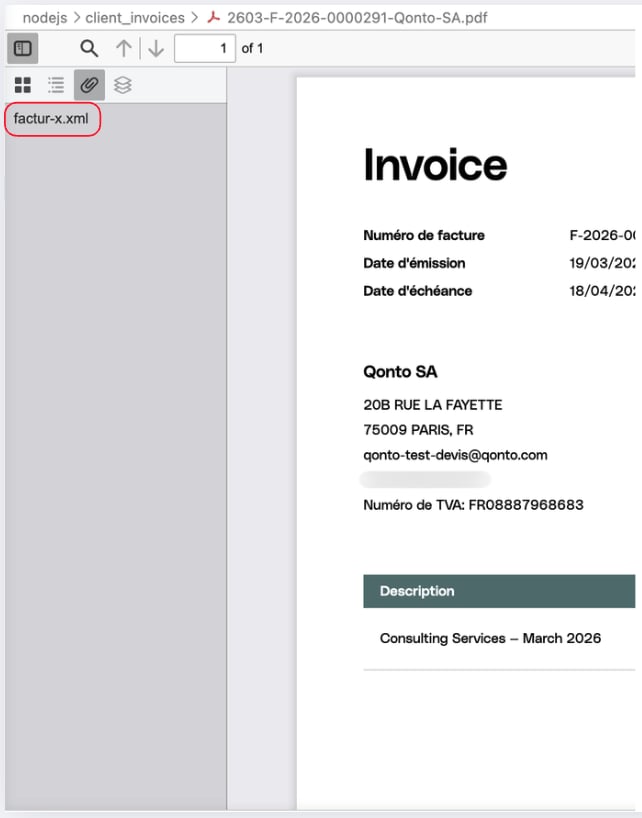
To verify the Factur-X XML is correctly embedded, open the PDF in Adobe Acrobat Reader and check for a paperclip icon, it should contain a factur-x.xml attachment.
Factur-X PDF example
Example output:
[Step 1] Find or create client
  Found existing client: b84a2798-xxxx-xxxx-xxxx-xxxxxxxxxxxx

[Step 2] GET /organization
  Receiving IBAN: FR761695xxxxxxxxxxxxxxxxxxx

[Step 3] POST /client_invoices (draft)
  Invoice draft created: 019d07ca-xxxx-xxxx-xxxx-xxxxxxxxxxxx

[Step 4] POST /client_invoices/{id}/finalize
  Invoice finalized at 2026-03-19T20:30:01Z — attachment_id: null

[Step 5] Poll GET /attachments/{id} until Factur-X is ready
  Attempt 1/15 — attachment_id not set yet, waiting...
  Attempt 2/15 - Factur-X PDF is ready!

[Step 6] Download Factur-X PDF
  Downloaded Factur-X PDF: ./client_invoices/2603-F-2026-0000291-Qonto-SA.pdf
We now have the finalized Factur-X PDF downloaded locally. It contains the embedded factur-x.xml file required for electronic invoicing compliance.